AI Detector
AI detector and AI checker: see what looks AI-written, and why
Paste a text, and Textumi's AI Detector tells you whether it reads as written by a person or by AI, with a label from “Human-written” to “AI-generated”. With an account it also marks the passages behind the result. We built and tuned the detector ourselves. A short text can be checked right on this page without signing up; the workspace, Textumi for macOS and your own AI assistant take longer texts.
Last month our team of 6 shipped the new checkout. It is worth highlighting that customers can now complete a payment in 2 clicks rather than 5. Support tickets about payments fell by 40%. I would like to express my sincere gratitude to each and every member of the team.
This text has formatting.
Check a text right here
Paste a text and press “Analyze text”: the result appears beside it in a few seconds. To see the passages behind it, continue in the workspace.
A signal beside your text, with passages you can inspect for yourself.
An estimate from the style of the text, not proof of authorship.
Start with the full context.
Paste a complete passage of at least 5 words. A longer passage gives a more reliable result.
Read the passages, not just the gauge.
Open the passage view to see where model signals agree or differ. The gauge shows the signal in five bands; it is not the probability that a person used AI.
Keep the judgment human.
Short, formulaic or heavily edited text can be misclassified. Use the result as a starting point for review, never as the sole basis for a consequential decision.
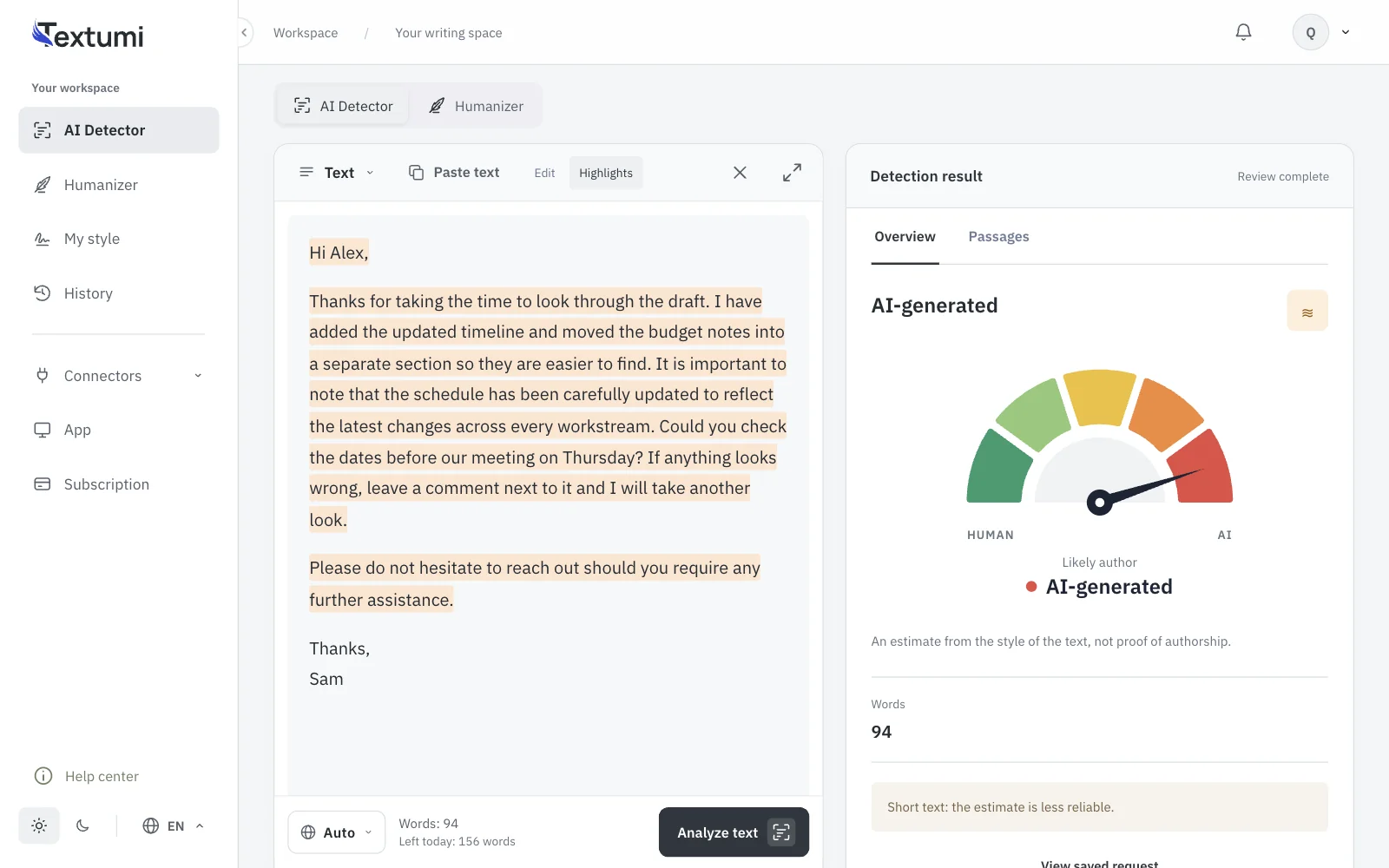
What the result shows
A result has two parts: a label for the whole text and, with an account, the passages that led to it.
The detector reads the whole text and places a needle on a gauge that runs from “Human” to “AI”. Under it you see one of five labels: “Human-written”, “Mostly human”, “Mixed: human and AI”, “Mostly AI” or “AI-generated”.
Each language has its own signal line. The first two labels sit below it: the detector found too little that looks like AI. The other three sit above it: the wording resembles AI writing, and the further right the needle, the closer the resemblance.
Every label is an estimate from the style of the text, not proof of who wrote it. Even “Human-written” does not prove that a person wrote the text, and human writing can get “Mostly AI”. “Mixed” and “Mostly” describe how the whole text reads, not a measured share: the detector does not measure how much of the text was generated.
In a longer text the detector also checks up to three paragraphs of 50 words or more on their own and marks them in the passage view. The marks may not cover the whole document: they point to what is worth rereading, and the judgment stays yours.
Where you can check a text
Right on this page, without an account. Paste up to 250 words and press “Analyze text” to see the label in a few seconds, up to three checks a day. Only the detector works this way: the Humanizer needs an account.
In the web workspace. Paste a text, or import it from a DOCX, PDF, ODT, RTF, TXT or MD file of up to 10 MB or from the URL of a public web page. Neither the file nor the page is stored.
In the Mac app, with the same account and the same allowances. It is part of every paid plan and needs macOS 14 or later on a Mac with Apple silicon.
Through your own AI assistant. The MCP connector lets Claude, ChatGPT and other assistants check a text with the Textumi detector right in the conversation. It is available on the Starter, Individual and Professional plans.
The Mac app, the connector for AI assistants, file and web-page import and text recognition from images all use the same detector, and we keep improving it.
Textumi for macOSTextumi for ChromeTextumi in your AI assistant
How the text you check is protected
Detection is done by Textumi's own models, so your text does not go to an outside AI provider. The connection uses HTTPS, and submitted texts and results are stored encrypted.
On every paid plan, a check stays in your private History for 30 days. You can delete any finished request before then.
The Free plan has no History: a result stays open for about an hour, and the request with its text and result is deleted within 7 days. It is encrypted the whole time, and Textumi's administrators can open it only for support and abuse prevention. Encrypted backups are kept separately and can hold a deleted text for some time longer.
Textumi does not sell personal data and does not automatically add your writing to shared training datasets. Do not submit sensitive personal data or texts you have no right to share.
Languages the detector reads
The detector works in 20 languages, with a separate model trained and tuned for each.
They are English, Ukrainian, Spanish, Portuguese, German, French, Italian, Polish, Dutch, Turkish, Romanian, Swedish, Arabic, Hindi, Indonesian, Vietnamese, Korean, Hebrew, Norwegian Bokmål and Danish.
In every language, a longer passage of ordinary prose gives the most reliable result.
The detector identifies the language itself, or you choose it. If it cannot identify the language with confidence, or the text is clearly not in the language you chose, you get an error message instead of a result from another language's model. The interface language has no effect on the check.
All languages and text limitsHow the detector is built and tested
How much text the detector needs
One check in the workspace accepts from 5 words up to 12,000 characters, and a longer document can be checked part by part. Without an account, the check on this page takes up to 250 words.
A few sentences carry too little to go on, so for a text of fewer than 50 words Textumi shows “Too little text to judge” instead of a label, in any language. Add more text: from 50 words up, you get a label.
Paste a whole passage of several paragraphs rather than single sentences out of context. Only paragraphs of 50 words or more are checked on their own, so a longer text gives the passage view more to show.
What the detector can and cannot tell you
The detector shows how closely the wording resembles the AI writing it was trained on, and where that resemblance is strongest. Before you send a draft of your own, this helps you find the paragraphs that sound generic.
It cannot tell you who wrote the text, which tool or model was used, or whether a person edited an AI draft.
Like any detector, it can be wrong in both directions, most often on short, formulaic, translated and heavily edited texts. A new check after rewriting describes the new wording, not the origin of the text.
Why human writing gets flaggedHow AI detectors work, and where they fail
Which plan to choose
Individual is made for one person's regular work: the detector and the Humanizer in the browser, the Mac app, work through your AI assistant, My style and a private History. Professional has all of that, with larger allowances, priority in the queue and several requests at once.
Starter is the smallest paid plan: the detector and the Humanizer in the browser and in the Mac app, work through your AI assistant and a private History. The Free plan has a small monthly allowance and no History.
Current prices and allowances are on the pricing page. Allowances reset on the first day of each calendar month (UTC), and unused words do not carry over.
Common questions
Can I check a text without signing up?
Yes. You can paste up to 250 words here and get the label without an account, up to three checks a day. The text is dropped as soon as the check is done and is not saved in any history. The marked passages, longer texts and the Humanizer need an account, and the text you checked stays in the tab while you sign up.
Which languages does the AI detector support?
Twenty: English, Ukrainian, Spanish, Portuguese, German, French, Italian, Polish, Dutch, Turkish, Romanian, Swedish, Arabic, Hindi, Indonesian, Vietnamese, Korean, Hebrew, Norwegian Bokmål and Danish. Each language is read by its own model, and the detector identifies the language itself unless you choose it.
Is an AI checker the same as a plagiarism checker?
No. A plagiarism checker looks for text that has been copied from another source. An AI detector, Textumi's included, reads how a text is written and estimates whether it looks AI-generated. A text can be fully original and still read as AI-written, or be copied from another author and still read as human. The two checks answer different questions.
How much text can I check at once?
In the workspace one check takes from 5 words to 12,000 characters, and larger documents can be checked in parts. Without an account, the check on this page takes up to 250 words. Either way, a text of fewer than 50 words gets “Too little text to judge” instead of a label, because the estimate would rest on too little. From 50 words up, you get a label.
Can I check a PDF or Word file?
Yes, in the workspace. You can import a DOCX, PDF, ODT, RTF, TXT or MD file of up to 10 MB or a public web page by its URL. The text is checked like pasted text, and neither the file nor the web page itself is stored. The check on this page without an account takes pasted text only.
How reliable is it on edited or translated text?
A translation or a heavy edit changes the wording the detector reads, so the result describes the text as it is now, not where it came from. That is true of every detector, and it is why short, formulaic, translated and heavily edited texts are the hardest to judge. Other detectors may disagree because each draws its line in a different place.
Can it detect text from ChatGPT, Claude or Gemini?
It checks text from any AI tool, ChatGPT, Claude and Gemini included. The detector analyzes the wording itself, not the model that produced it, so it never names a model. The label, from “Human-written” to “AI-generated”, depends on the wording, length, genre and language of the text.
Does “AI-generated” prove that a text was written by AI?
No. “AI-generated” means the wording closely resembles the AI texts the detector was trained on. It is an estimate from style, not proof of authorship: human writing sometimes gets “Mostly AI” or “AI-generated” too, especially when it is short, formal or heavily edited. Read the marked passages and weigh the result together with drafts and other evidence of how the text was written.
What do “Human-written” and “Mostly human” mean?
The needle stopped below the signal line for that language. The detector found too little that looks like AI, which is not the same as proving that a person wrote the text. As with any detector, AI writing is sometimes missed, most often in short or heavily edited texts.
Is my text stored or used for training?
On every paid plan, a check stays in your private History for 30 days, unless you delete it earlier. On the Free plan, the result stays open for about an hour and the request is deleted within 7 days. It is encrypted the whole time, and Textumi's administrators can open it only for support and abuse prevention. A check on this page without an account doesn't store any text: it is dropped when the result is ready. Textumi doesn't automatically add your writing to shared training datasets, and the texts the detector was trained on don't include any customer texts.
Try it on your own text.
Your original stays beside the result, so you can compare before you copy.
It also works in your browser, with the same account, plan and allowance: Textumi for Chrome